

Introduction
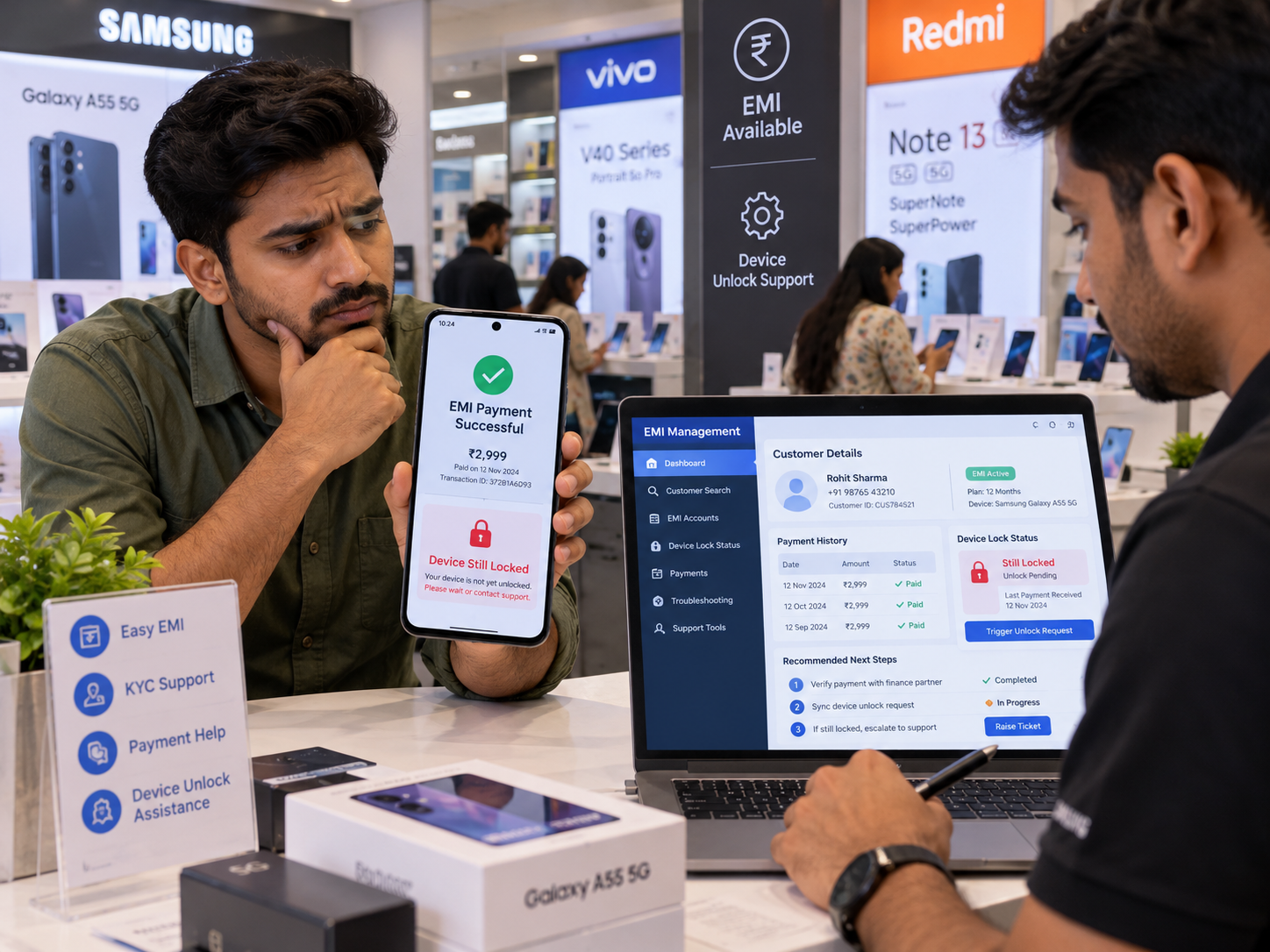
A customer has paid their phone EMI, but the smartphone is still locked. They call the retailer, saying, "I have already made the payment, so why is my phone not unlocking?" This situation can be frustrating for both mobile retailers and customers, especially when the payment has been completed successfully.
Sometimes, an EMI Locker App may not update the payment status immediately, or the unlock command may be delayed. This does not always mean there is a serious problem with the software. Understanding what happens if a customer pays EMI but the phone remains locked can help retailers identify the issue, resolve it quickl and avoid unnecessary customer complaints.
In this guide, we explain why an EMI phone remains locked after payment, how to fix it and how EMI Locker Software can help manage financed smartphones.
Why Is the Phone Still Locked Even After EMI Payment?
When a customer pays an overdue installment, they expect their smartphone to unlock. However, the unlocking process may depend on payment confirmation, internet connectivity, and the device management system. Here are some common reasons why an EMI-locked phone remains locked after payment.
1. EMI Payment Status Has Not Been Updated
Sometimes, customers complete their payments through UPI, bank transfers, or other payment methods, but the transaction does not immediately appear in the retailer's system. This may happen because of delayed payment confirmation or synchronization issues.
What should retailers do?
- Check the customer's transaction details.
- Verify the payment reference number.
- Confirm whether the amount has been received.
- Update the EMI payment status after verification.
Once the payment is confirmed, the authorized unlocking process can begin.
2. The Customer's Phone Is Offline
An EMI Locker App may require internet connectivity to receive remote unlocking commands. If the customer has switched off mobile data or Wi-Fi, the command may remain pending.
How to fix it:
Ask the customer to connect their phone to a stable internet connection, if the restricted device allows it. Then check whether the pending unlock command has been delivered. Some EMI Locker solutions may support alternative unlocking methods, depending on their configuration.
3. Remote Unlock Command Is Delayed
Even after payment verification, the phone may remain locked if the remote unlocking command has not been processed. This can happen due to temporary server issues, device connectivity problems, or delayed synchronization.
What should retailers check?
- Is the device showing online or offline?
- Has the unlock command been sent?
- Is the command still pending?
- Does the dashboard show any error?
If the command fails repeatedly, contact the software provider's technical support team.
4. EMI Locker App Has a Technical Issue
Sometimes, an outdated application version or a device compatibility problem can affect the unlocking process. Android updates and software errors may also cause certain management features to behave unexpectedly.
Possible solutions:
- Check whether the EMI Locker App is updated.
- Verify device compatibility.
- Review the enrollment status.
- Contact the authorized support team.
Do not uninstall the application, factory reset the phone, or remove device management controls without proper authorization.
How to Unlock an EMI-Locked Phone After Payment
Suppose a customer visits your mobile shop after paying their overdue installment, but their phone still displays an EMI lock message. Instead of asking the customer to pay again, follow these steps.
Step 1: Confirm the EMI Payment
First, check whether the customer's installment has been received. Review the payment receipt, transaction ID, installment amount and financing account details.
Step 2: Check the EMI Locker Dashboard
Open the EMI Management Dashboard and locate the customer's financed smartphone. Check whether the EMI status is marked as paid or overdue.
Step 3: Verify the Unlock Authorization
If the lender has confirmed that the relevant payment conditions are satisfied, verify that the device is eligible for unlocking.
Step 4: Send the Remote Unlock Command
Use the authorized device management controls to send an unlock request to the supported smartphone.
Step 5: Confirm That the Phone Is Unlocked
Ask the customer to check whether normal device access has been restored. Do not close the support request until the unlocking status is confirmed.
For more guidance, read How to Unlock an EMI-Locked Phone Safely, which covers authorized device unlocking and precautions retailers should follow.
What If the EMI Is Paid but the Phone Still Won't Unlock?
If the phone remains locked after payment verification and an unlock request, the retailer should investigate the problem rather than repeatedly sending commands.
Check whether:
- The correct customer account was selected.
- The device is properly enrolled.
- The payment has been verified by the lender.
- The unlock request has reached the phone.
- The software is reporting a technical error.
If the problem continues, escalate the issue to technical support with the device details and payment confirmation. Retailers should avoid unnecessary delays, as continued restrictions after verified payment may inconvenience customers and lead to complaints.
How Can Retailers Prevent EMI Phone Unlocking Problems?
The best way to manage unlocking issues is to maintain accurate EMI records and follow a clear payment verification process.
Here are some useful practices.
Keep Customer Payment Records Updated
Make sure completed installments are recorded correctly. Incorrect information can lead to unnecessary locking or unlocking delays.
Use Reliable EMI Management Software
Choose an EMI Locker App that provides clear device status information and supported remote management features.
Explain the Payment Process Clearly
Tell customers how payments are confirmed and whom they should contact if their smartphone remains locked.
Train Retail Staff
Employees should understand how to verify transactions, identify the correct customer account, and request authorized unlocking.
Provide Quick Customer Support
When customers report a locked phone after payment, acknowledge their complaint and explain the resolution process.
For more useful tips, explore Best Ways for Mobile Retailers to Manage Customers Buying Phones on EMI.
Better customer management can reduce payment confusion and improve the overall financing experience.
Can an EMI Locker App Help Avoid Payment and Unlocking Disputes?
An EMI Locker App for Mobile Retailers can help organize financing information and make device management easier.
Depending on the software and payment integrations, useful capabilities may include:
- EMI Payment Tracking: Monitor recorded installments and outstanding balances.
- Remote Unlocking: Remove authorized device restrictions on supported smartphones.
- Device Status Monitoring: Check whether a financed phone is active, restricted, or offline.
- Payment Reminders: Notify customers about upcoming and missed installments.
- Customer Management: Maintain financing details and payment schedules.
- Centralized Dashboard: Review multiple financed smartphones from one platform.
These features can help retailers reduce manual errors and identify payment-related issues more efficiently. However, software does not replace the need for payment verification, customer communication and proper dispute resolution.
How White Label EMI Locker Helps Retailers Manage EMI Phone Unlocking
White Label EMI Locker offers customizable EMI device management solutions for mobile retailers, distributors, NBFCs and finance companies in India. It helps businesses organize financed smartphone operations and manage supported devices through a centralized dashboard.
Key capabilities include:
- Remote Lock and Unlock: Manage authorized device restrictions on compatible smartphones.
- EMI Payment Tracking: Monitor installment schedules and recorded payment information.
- Customer Management: Maintain customer accounts and financed device details.
- Payment Reminders: Keep customers informed about upcoming and overdue installments.
- Centralized Device Dashboard: Manage enrolled smartphones from one platform.
- Custom Branding: Launch an EMI Locker solution with your own business identity.
Businesses should confirm supported device compatibility, payment synchronization options, and unlocking procedures before choosing a software configuration.
Conclusion
Understanding what happens if a customer pays EMI but the phone remains locked is important for mobile retailers and finance companies that want to avoid payment disputes and maintain customer trust. A phone may remain locked because of delayed payment confirmation, poor internet connectivity, pending unlock commands, or technical issues. By verifying payments, checking device status and following the authorized unlocking process, retailers can resolve these problems more efficiently. White Label EMI Locker offers customizable EMI Locker Software to help businesses manage financed smartphones, track installment schedules, send payment reminders, and handle device locking and unlocking through a centralized platform.
Want to simplify EMI management and provide a better experience for your customers? Contact White Label EMI Locker today to explore a branded solution for your mobile retail or financing business.
Website: https\://whitelabelemilocker.com/
Phone: +918882653043
Email: info@whitelabelemilocker.com
Ready to Launch Your White Label EMI Locker?
Talk to Aditya Gupta — Founder & CEO of Devolyt Technologies — and get a custom quote for your EMI Locker platform.
Get a Free Consultation →